
Pick the annotation shape your model trains on
The toolbar offers seven shapes to draw and nothing in the app tells you which one your training run wants. Most people pick by feel, label a few hundred images, and find out at export time: the polygons that took a week come out of the converter as plain boxes, or a detection export skips every shape that is not a rectangle and warns about it.
This guide is the decision you make before the first shape. Three questions settle it, and then the shape-by-shape guidance follows from your answers. Getting it wrong is not a bug you fix in code later. It is a relabeling pass over every image you have already finished.
Three questions before the first shape
What does the training format actually consume?
Start at the end of the pipeline, not the beginning.
A COCO instance annotation carries both a bbox as [x, y, width, height] and a segmentation that is a list of polygons or an RLE, per the COCO data format. Its keypoint annotations are a separate keypoints array of [x, y, visibility] triples, one per named body point.
Ultralytics YOLO splits the same information across four different label layouts. Detection is one row per object, class x_center y_center width height, normalized to 0–1. Segmentation is class followed by normalized polygon points. OBB is class followed by four normalized corners. Pose is a box followed by the keypoint coordinates.
Pascal VOC keeps detection and segmentation in different places entirely: per-object xmin, ymin, xmax, ymax in the XML annotation, and indexed PNG masks in SegmentationClass and SegmentationObject where every pixel carries a class or an object number (VOC2012 development kit, sections 2.6, 9.1 and 10.2.2).
The useful thing that falls out of this list: a box-only format discards everything you drew that was not a box. The dataset toolkit's export-to-yolo computes a bounding box for polygons and masks rather than failing, so the export succeeds and the silhouette quietly does not survive. The VOC detection example script in the labelme repository is blunter still, and skips any shape that is not a rectangle with a warning.
What does the shape cost to draw?
A rectangle is a press and a drag: two points. A circle is a center and an edge: two points. A point is one click. An oriented rectangle is three, because the second click is what locks the heading.
A polygon costs one click per vertex, and the number of vertices is up to you and the object. That is the whole cost difference, and on a dataset of any size it is the number that decides your schedule.
These are not conventions, they are enforced. Labelme validates the exact point count for every fixed-arity shape when an annotation file loads: one for point, two for rectangle, line, circle, and mask, four for oriented_rectangle.
What will it cost to fix?
Only polygon and linestrip accept new vertices — Alt+click an edge adds one, Alt+Shift+click removes one (the keyboard shortcuts guide has the full set). Every other vector shape has a fixed point count, so correcting one means dragging the handles it already has, never adding detail where the object needed more.
A mask has no vertices at all. Labelme's vertex hit-testing returns nothing for mask and point shapes, so a mask that is slightly wrong is redrawn, not nudged. That makes masks the most expensive shape to review, which matters more than it sounds: review is where most annotation time goes.
The same bus, three ways
One object, one image, three shape types. Nothing here changes except what was drawn.
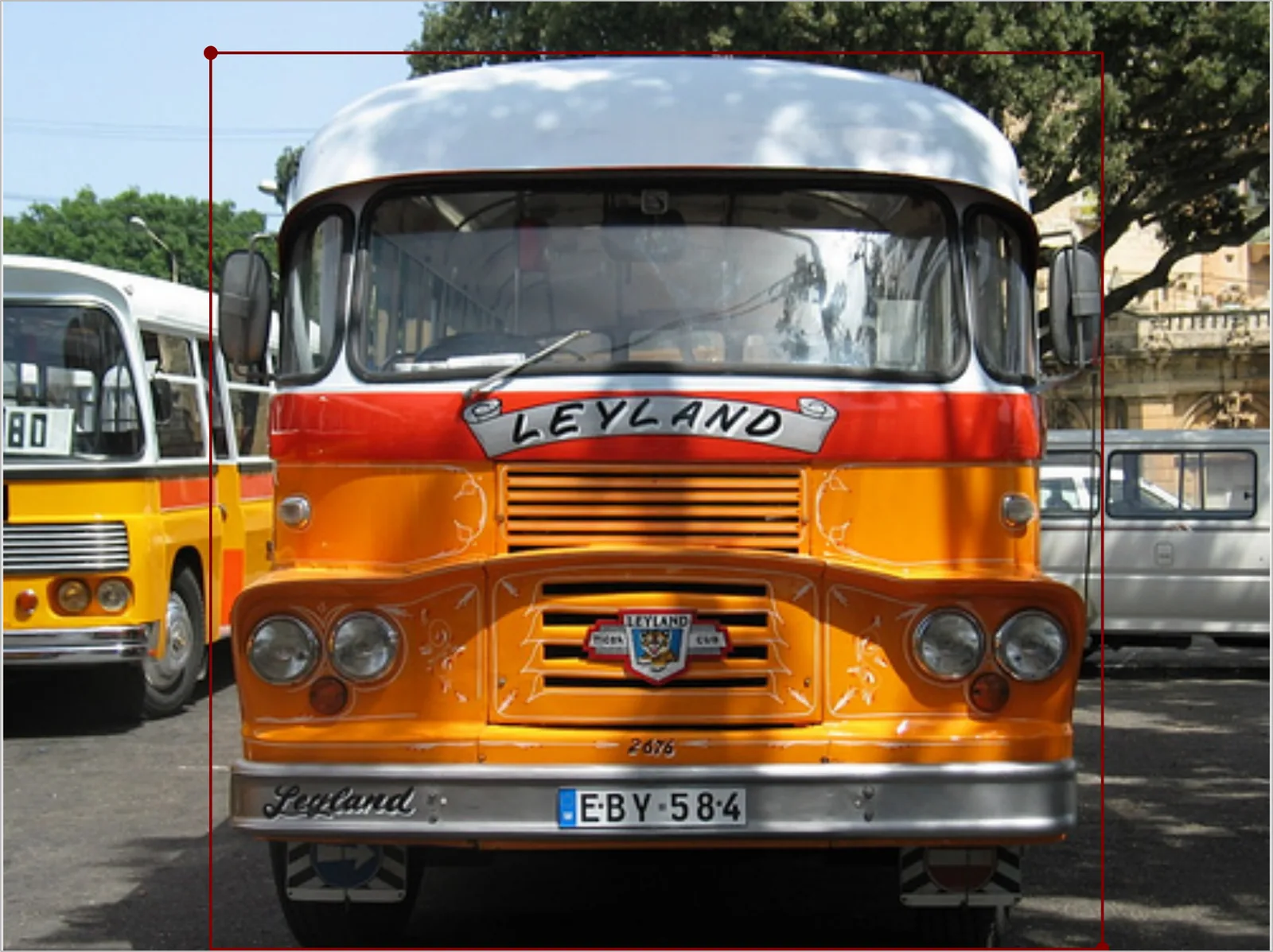
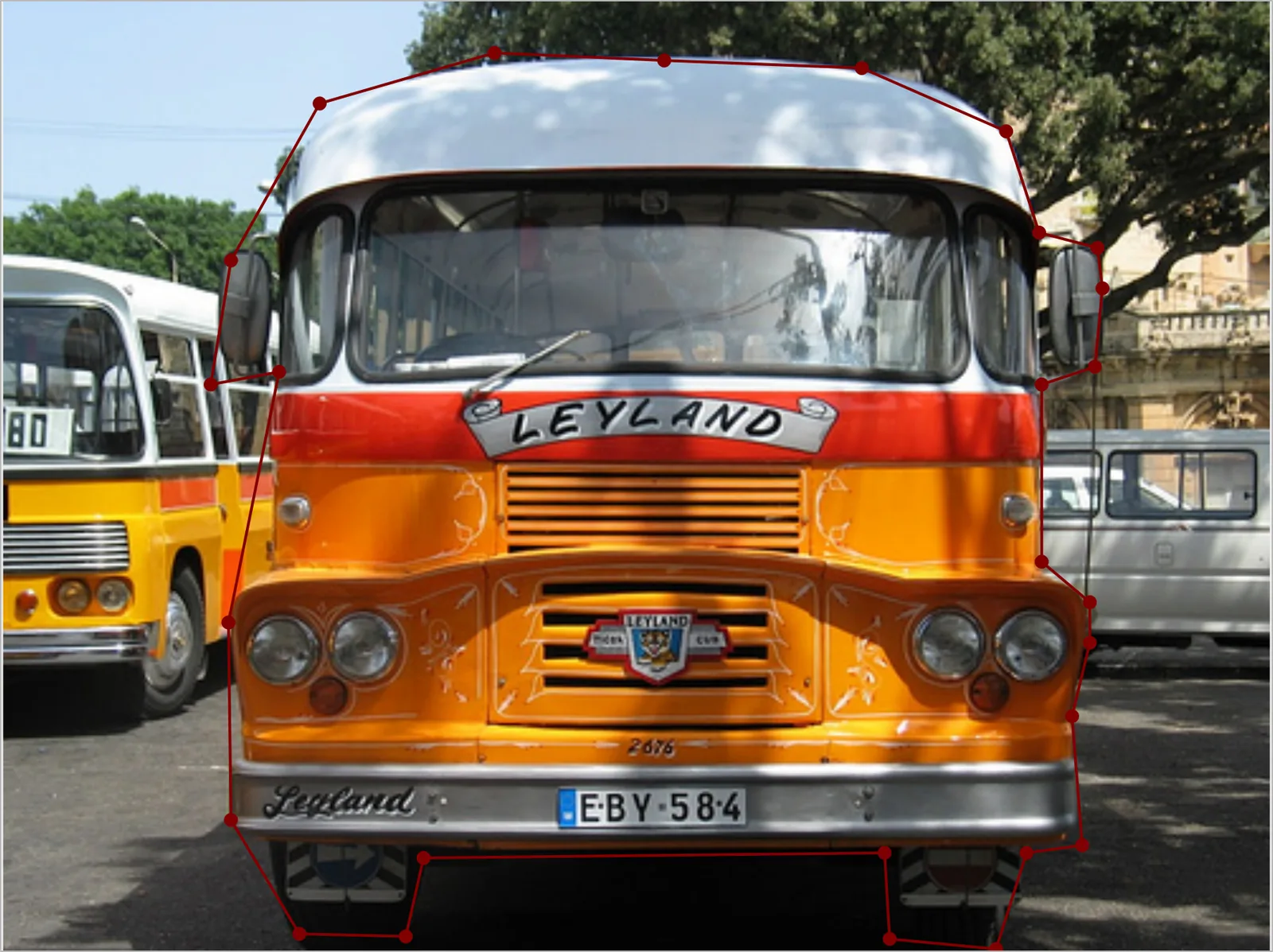
The rectangle is two points. Measured against the polygon beside it, 18% of what it encloses is not bus at all — a slice of the neighboring bus on the left, a tree and a parked van on the right. For a detector that is fine, because that is exactly what detectors are trained on. For anything that reasons about the object's extent, those pixels are labelled bus.
The polygon costs 27 clicks and gets the mirrors, the roof curve, and the daylight under the bumper. It is also the shape that survives the most conversions: the toolkit reduces it to a bounding box whenever the format only wants one, and the labelme repository's COCO example script writes it out as a segmentation. No one-command YOLO segmentation export exists yet, but the polygon is the shape that already holds every coordinate such an export would need.
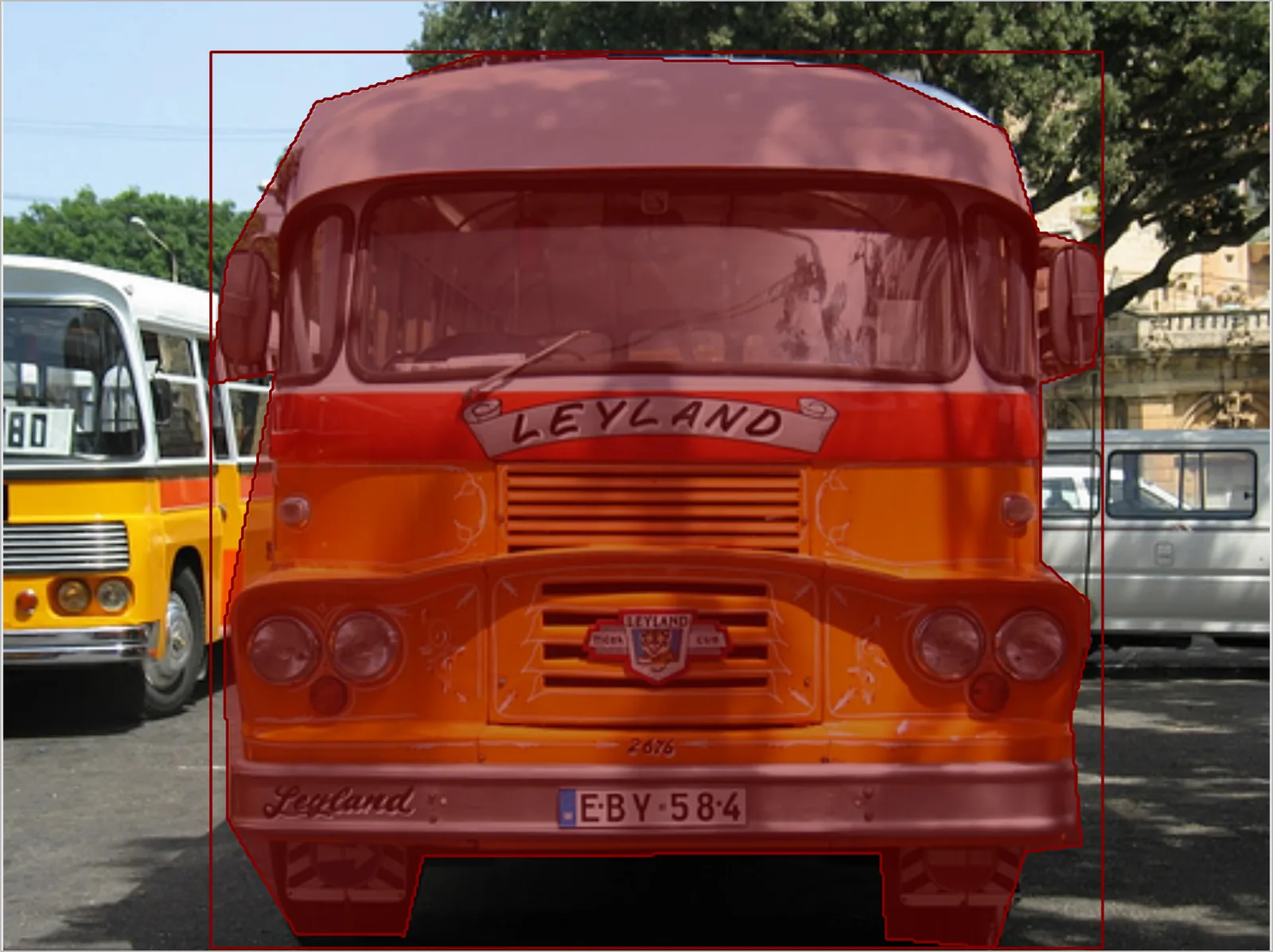
The mask stores per-pixel truth instead of a boundary, so it can hold detail no polygon vertex budget would reach. Note what the canvas shows: a filled region and a bounding box, and no handles. That is the trade.
All three are offscreen renders of Labelme v7.2.0 on the same file, examples/instance_segmentation/data_annotated/2011_000025.jpg from the labelme repository.
Shape by shape
Rectangle. The default for object detection, and the shape every standard detector is trained on. Two points, no ambiguity, and it maps directly onto YOLO detection rows and VOC bndbox entries. Reach for it whenever the task is "where is it" rather than "what shape is it".
Oriented rectangle. The same cheap description with the heading kept. Worth the third click whenever an axis-aligned box would swallow the neighbor: aerial vehicles, conveyor items, lines of scanned text. It is also the only shape that reaches YOLO-OBB without a fitting step — the toolkit writes its four corners verbatim and refuses to guess one from a polygon.
Polygon. The instance-segmentation workhorse and the most convertible shape you can draw. Pick it when the silhouette carries information, or when you are not yet sure which format the dataset ends up in. If AI Assist is drawing them for you, Polygon Detail decides how many vertices you inherit, which is the same cost question asked at review time instead of drawing time.
Mask. Pixel-accurate segmentation for thin structures, blurred boundaries, and anything a vertex chain flattens: wires, hair, smoke, tissue margins. It is the one shape with no drawing tool of its own — it comes out of AI Assist, which is also the honest signal about its cost. Check your exporter first, because the support is uneven even inside one repository. The labelme repository's COCO example script rasterizes every shape through a helper that raises on mask; its VOC segmentation example script takes a different path that pastes the stored mask and handles it fine. In the dataset toolkit, export-to-voc gained mask support in v0.1.2, while export-to-yolo reduces a mask to its bounding box like any other non-rectangle.
Linestrip and line. Open polylines for things with length but no meaningful interior: lane markings, cracks, cables, cell membranes, a scale bar. No mainstream detection or segmentation format has a slot for them, so they reach a raster export only by being stroked at a fixed 10-pixel width. If that width is not the width you meant, the polyline is data for your own code to read out of the Labelme JSON, not something to hand to a converter. Linestrip shares polygon's editing model, so it is the one open shape you can add detail to later.
Point and circle. A point is a landmark: one click, and the natural fit for COCO keypoints or YOLO pose, both of which want an ordered set of named points per instance rather than one shape per point. Give each landmark its own label, or group them, and read the ordering out yourself — neither export is a single toolkit command today. A circle is the two-point description of a round object, tighter than four box edges for cells, wells, coins, and storage tanks, and it converts cleanly: labelme2coco.py turns each circle into a polygon segmentation on the way out.
When you cannot decide, draw the richer shape
The conversions are not symmetric. A polygon becomes a box for free, because that is what a box-only exporter already does with it. A box does not become a silhouette without a person redrawing it.
So when the downstream format is genuinely unsettled, the polygon is the shape that keeps your options open, and the question becomes whether you can afford the clicks. When it is settled, draw the cheapest shape that format can consume and stop there — a polygon fed to YOLO detection is a week you spent on coordinates the training run throws away.
Two situations are worth naming because they change the answer rather than shading it. If your objects run off the frame, the shape you draw is only honest if points can sit outside the image; otherwise every cropped instance gets a false straight edge along the border. And if the image is packed with instances of the same class, AI Assist's suppression passes are what make a second pass additive, which is what makes the expensive shapes affordable on crowd data at all.
The shape types and point counts above are as they ship in Labelme v7.2.0.