
Auto-save is on by default
The most common report we got from users in the v5 era was a variant of the same story. Two hours of careful polygons. A crash, a closed window, a switched image without a save. Everything gone.
It was avoidable. The Save Automatically option existed in v5; it was off by default. Almost nobody changed it because almost nobody knew it was there.
Labelme v6 ships with auto-save on.
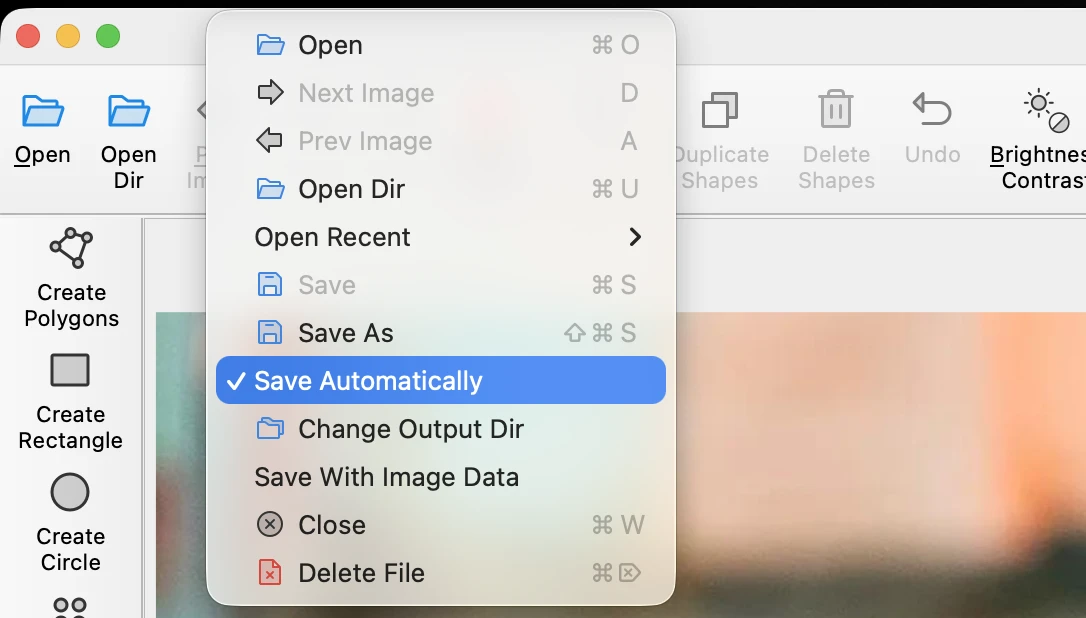
How it works
Every shape edit triggers a save. Draw, delete, drag a vertex, rename a label: the JSON on disk is updated before you've moved on. You can close the app at any point without losing the last action.
Switching images saves the current one. Moving to the next file in the folder commits whatever is on the current one. No prompt, no "do you want to save?" dialog.
You can still turn it off. Uncheck File → Save Automatically in the menu, or set auto_save: false in your config file. If you have a reason to want manual saves, the option is one click away.
When it matters most
- Long QA sessions. Hours of small corrections across hundreds of images. You should not be remembering to save.
- Demos and walkthroughs. Recording a clip, sharing a screen, handing the laptop to a colleague. Auto-save means there's no failure mode where the demo machine lost the work.
- First-time users. New annotators learning the tool used to lose their first session about half the time. Now they don't.
Migrating from v5
Existing v5 users who installed v6 over the top inherit their previous setting (off, if they never changed it). To match the new default, open the menu and check File → Save Automatically once. Fresh v6 installs get auto-save on without any action.
See the v6.0 release notes on GitHub for the full changelog, including the related JSON-format change that pairs well with auto-save (annotation files no longer embed image data, which keeps the on-disk footprint small even when every edit writes). The default flip and the --no-autosave CLI rename landed in #1815.
Update from the download page. If a save ever fails silently, open an issue — that's the kind of bug that has to be loud.