
SAM3 AI-Box mode, one prompt for a whole crowd
The point of AI-Box has always been "click once instead of drawing the polygon by hand." That's a real speedup when the box contains one object. When the box contains forty cars, the speedup goes away. You either accept a single mask that wraps the whole cluster, or you drag forty separate boxes.
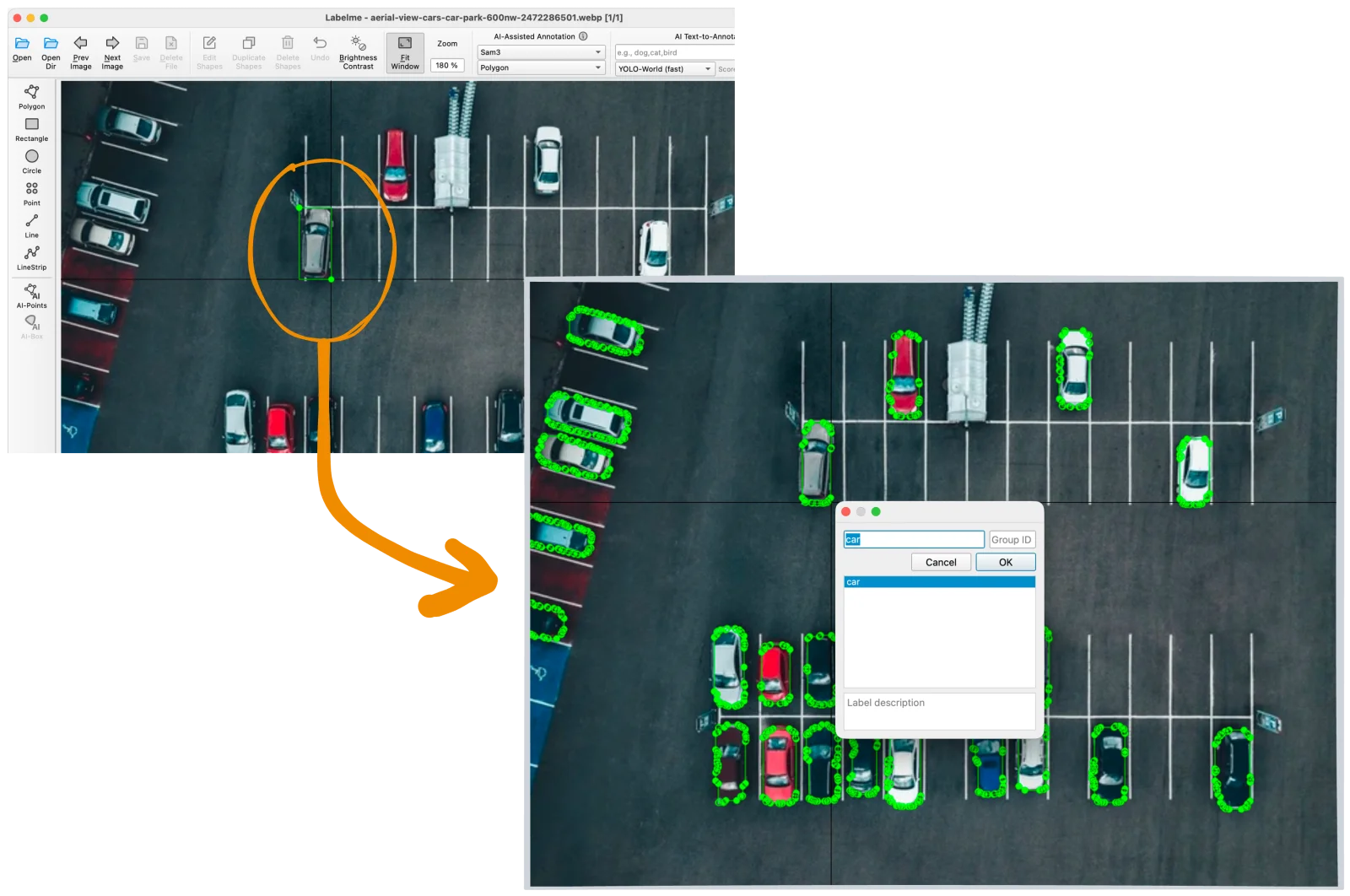
Labelme v6.1 adds SAM3 AI-Box mode, where one box returns one shape per instance.
How it works
Pick the SAM3 model in the AI-Box dropdown. AI-Box ships with multiple SAM backends; SAM3 is the one that understands "find every instance in this region." Older SAM variants are still there for the single-mask case.
Drag the box around the cluster. The model receives the box as a region prompt and returns one mask per instance it detects inside. Each mask becomes its own shape on the canvas.
Each instance gets the same label. Every shape produced by a single SAM3 prompt shares the label dialog you pick once, so a parking-lot box becomes forty car shapes in one step.
When to reach for it
- Aerial parking lots and motor pools. The canonical case. Every car is the same class, every box you'd draw by hand is identical work.
- Retail shelves. Identical SKUs lined up, each one needing its own bounding shape.
- Microscopy. Cells, colonies, particles in a frame. The frame contains a hundred instances; you'd rather not click a hundred times.
- Stadium crowds, herds, schools. Anywhere "many instances of the same thing in one region" is the recurring case.
For a single, isolated object, the older AI-Box modes are still the right tool. SAM3 is for the case where one box ought to do the work of many.
Pairs well with
AI-assisted annotation for crowd objects, shipped later in v6.3, suppresses the duplicates that fall out of SAM3 when nested masks overlap or a second pass re-prompts the same region. The two together make SAM3 in a dense scene feel like a clean, additive workflow.
Where to find it
Update to Labelme v6.1 or later from the download page. SAM3 sits in the AI-Box model dropdown; the older modes are unchanged.
See the v6.1 release notes on GitHub for the full changelog. SAM3 AI-Box landed in #1917, with #1918 gating the unsupported AI-Points combination and #1919 cropping the input for large images.
If a prompt returns nothing or returns the cluster as a single mask instead of separated instances, open an issue with the image and box or ask on Discord.