
Settings you change now stick
You turn on Save Automatically, work through the afternoon, close Labelme, and open it the next morning to find it off again. Six toggles behaved that way. Flipping one changed the session you were in and nothing else.
Those six now stay where you put them. You set up the way you like to work once, and it is still that way tomorrow.
The six that used to reset
- Save Automatically and Save With Image Data, in the File menu.
- Keep Previous Zoom, Keep Previous Brightness/Contrast, and Fill Drawing Polygon, in the View menu.
- Keep Previous Annotation, at the bottom of the Edit menu (
Ctrl+P).
Flip one from a menu and it is saved right away. Change it in Settings and the menu checkmark follows. The two controls no longer disagree.
Keep Previous Annotation gains the most. It carries the shapes you just drew onto the next image, which saves real time across a run of similar photos. Until now, turning it on was a decision you had to remember to repeat every session.
Settings covers more of the app
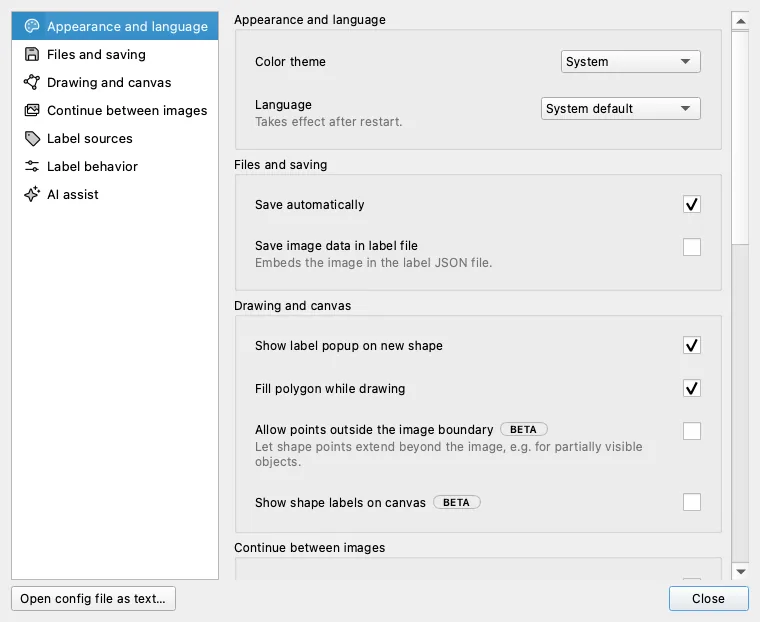
The dialog held 8 settings. It now holds 19, in seven sections you can jump between from the list on the left.
Eleven of those are new to the dialog:
- Save automatically and Save image data in label file
- Keep previous annotation, Keep previous zoom, and Keep previous brightness/contrast
- Fill polygon while drawing
- Sort labels, Show label text field, and Label completion, matching either Starts with or Contains
- Under AI assist, Default model and Suppress existing Shape matches, which highlights a shape you already drew instead of adding a duplicate
Default model is the same choice as the dropdown in the AI panel, so the model you prefer is the one waiting at startup.
Two things to know. Language takes effect after a restart. A handful of advanced options still live only in the config file, which the dialog's Open config file as text… button opens. If you start Labelme with --config on the command line, Settings stays disabled for that session.
Persistent toggles and the expanded dialog are in the v7.1.0 release; the implementation has the technical detail. The Settings dialog itself arrived in v7, and auto-save has been on by default since v6.